Ce contenu n’est pas encore disponible dans votre langue.
Base de connaissances VYV Technologies
Reference, procedures and explanations for every product.
What is not on your product is dimmed, not hidden.
What’s in it for you
VYV can provide counsel and guidance at every stage of a production — from design intent and projection, calibration and tracking studies, to previsualization, workshops and show programming. Bring our experts in at the very beginning of your creative process.
Learn moreProper system installation is critical. VYV helps you with racks, I/O boards and network topology, and supports your factory and site acceptance testing, system integration and upgrades — so you reach optimal system performance.
Learn moreWith VYV’s technologies, you bring media, tracking and output together on a show: 3D models and media imports, timeline editing, VFX, compositing and color grading, third-party integration and automated back-up — then VYV’s guides and hand-over training let your team run the show on its own.
Learn moreDocumentation
Requirements, installation, network and graphics cards, for PHOTON, XENON and TACHYON.
How the interface behaves everywhere: values, sliders, menus and labels.
Build and validate the show in a 3D scene before you deploy, and deliver an exceptional experience to the audience.
Connect everything that enters or leaves the servers: signal, control, power, protocol.
Make the projected image land where the model says it should.
Drive fixtures from tracking data — console, patch, universes, virtual IDs.
Install and calibrate the tracking rig behind real-time interactivity and automated spatial alignment.
Import, convert and organize your media files — the go-to place for all of it.
Author the show with graphs, compositing, cues and effects.

Lumi, your personal assistant
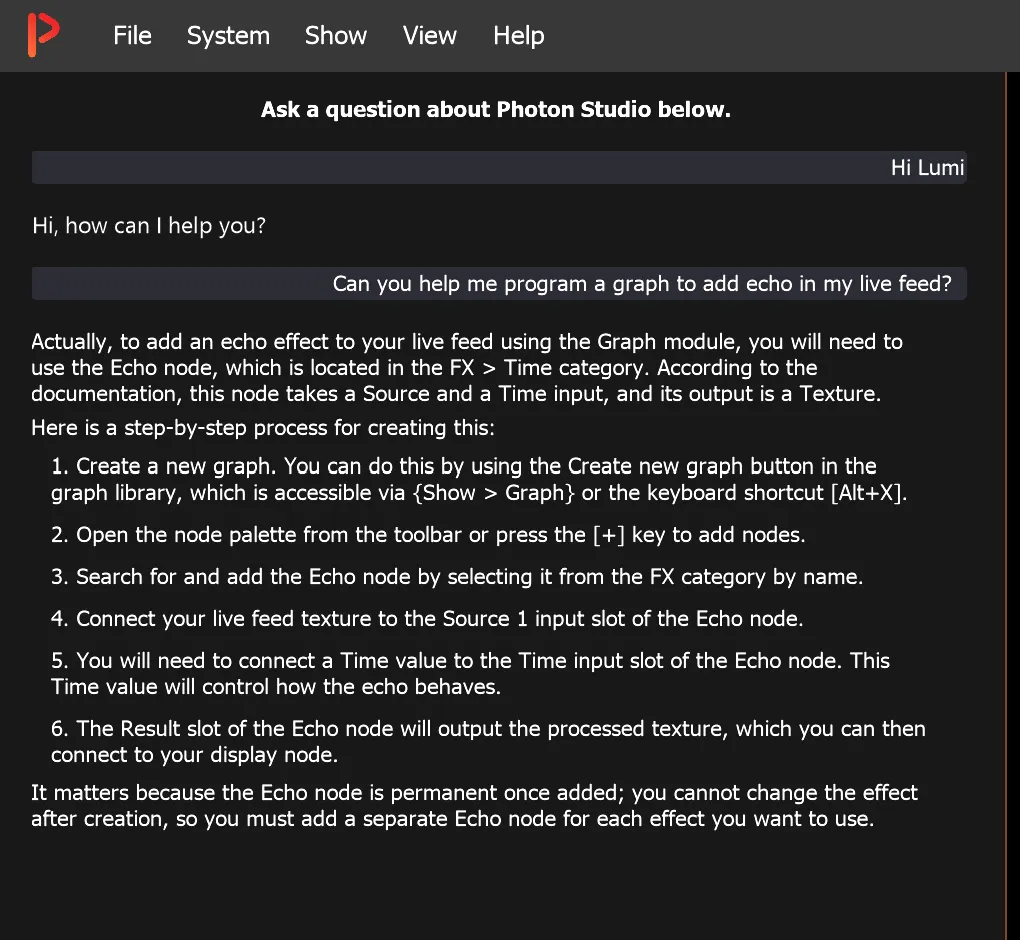
Lumi is always there, ready to help as soon as you ask.
Ask in everyday words, in your own language.
Get help doing things, not only finding them: where a setting lives, which step comes next, what a parameter changes.
Lumi reads your programming. When you’re not getting the result you want — in a graph, for example — Lumi looks at it, describes what’s there and suggests a way to get there.
Lumi knows the entire Knowledge Base and brings deep expertise.