PHOTON XENON TACHYON
The Settings module Control tab contains two dropdown menus that will help you determine which server has access to which control data stream. TACHYON or PHOTON can receive the following control data stream protocols:
- MIDI
- OSC
- DMX (sACN & Art-Net)
By selecting specific servers in these dropdown menus, you will inform TACHYON or PHOTON to allocate resources on the appropriate servers to receive and treat incoming data control streams. Once these streams are acquired by the specified servers, all of the others included in the Server Group will be able to access the data and will work in sync. It is highly recommended to specify which servers are receiving control data streams in order to reach optimal performances.
The interfaces linked to the various types of control data streams can be accessed through the I/O Manager module. Select OR press Alt + I to open the I/O Manager window so you can monitor the state of the following I/O Control Interfaces: MIDI, DMX, Network Protocol, OSC. (The I/O Manager module contains additional tabs related to external systems, software and devices.)
TACHYON or PHOTON can receive Timecode, both in MIDI and LTC format. Ingested Timecode will control the Timeline module’s Playhead. The I/O Control assignation dropdown menus do not have any effect on incoming LTC Timecode since it is encoded in an audio format. However, if you are planning to receive MIDI Timecode, you will need to specify to which server the stream will be sent.
Access the Control Assignation Tab
- Select from the main menu OR press Alt + S to open the Settings module and select the Control tab.
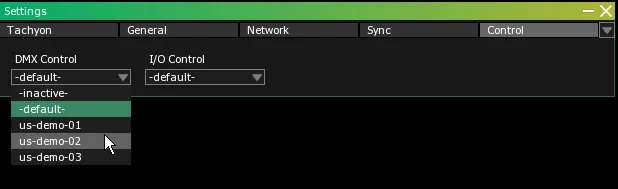
This menu can be used to specify to which server will be routed the control data streams. Three different types of selection can be made with this menu:
- If a server included in the Server Group is acting as a Controller, it will by default be designated to be in charge of the control data streams.
- If there is no Controller in the Server Group, the server operating as the Display Master will be designated by default to be in charge of the control data streams.
- If there are multiple Controllers (or multiple Display Masters and no Controller) in the Server Group, conflicts are avoided by selecting by default the server that has the lowest IP address.
- If
inactive is selected in the I/O Control dropdown menu, no server in the Server Group will listen to any control data stream.
- The selected server will be designated to receive the control data stream, including DMX if the
-default- option is still selected in the DMX Control dropdown menu. Otherwise, DMX will be routed elsewhere apart from the rest of the control data stream.
- This menu is strictly dedicated to specifying to which server the DMX stream will be routed, apart from the other control data streams. Three different types of selection can be made with this menu:
- The DMX data stream will be assigned to the server which receives the other control data streams. (Therefore, the DMX data stream is not segregated from the other control data streams.)
- If
inactive is selected in the DMX control dropdown menu, no server in the Server Group will listen to any DMX data stream.
The selected server will be designated to receive the DMX data stream. The stream will be sent to the specified server apart from the other control data streams.