PHOTON TACHYON
TACHYON or PHOTON features different System Modes which represent the functions linked to the roles assigned to each server in the Server Group.
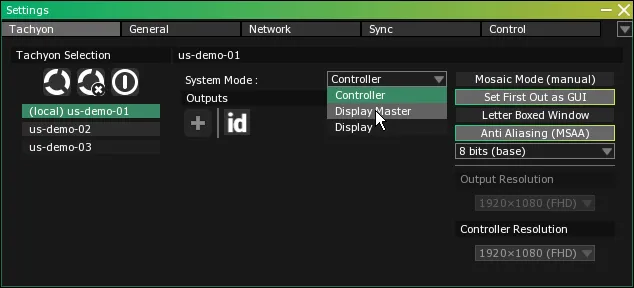
Access the Server System Modes Dropdown Menus
- Select from the main menu OR press Alt + S to open the Settings module.
- Make sure the TACHYON or PHOTON tab is selected.
Hierarchy
A TACHYON or PHOTON Server Group is organized around a primary server which maintains synchronization and control over the remaining secondary servers. The primary server will also communicate with external devices such as audio interfaces, MIDI controllers or lighting consoles. Secondary servers are used to display images through their graphics card output ports.
If for any reason the primary server is dropped out of the Server Group and another server isn’t set up to take its place, the server with the lowest number IP address will take care of the group’s synchronization and control.
Even though a Server Group is driven by a central primary unit, a complete copy of the show’s data resides on every server.
Each server acts like a backup unit (with one notable exception; see Controller further on in this section).
System Modes and servers roles
TACHYON or PHOTON servers feature different System Modes. These System Modes will affect how a server behaves in relation to others within a TACHYON or PHOTON network. System Mode attribution is based on the role that is assigned to each server.
Display Master
- synchronize and control the Display Servers located on the network.
- import and convert media in full resolution and will be able to output content for the Screens that have been assigned to it.
Warning:While it would be tempting to see this mode as a practical replacement for a Controller, keep in mind that using a Display Master Server comes with drawbacks related to overall system performance.
Primary servers set in Display Master mode are usually found in simple installations, not large-scale productions.
Computer Vision PHOTON
In addition to this hierarchical relationship, VYV’s product line includes ALBION, a server specialized in advanced computer vision tasks such as the handling of tracking data. This unique product is linked to a specific Operation Mode.
Operation Modes PHOTON
Here are PHOTON’s Operation Modes:
Albion
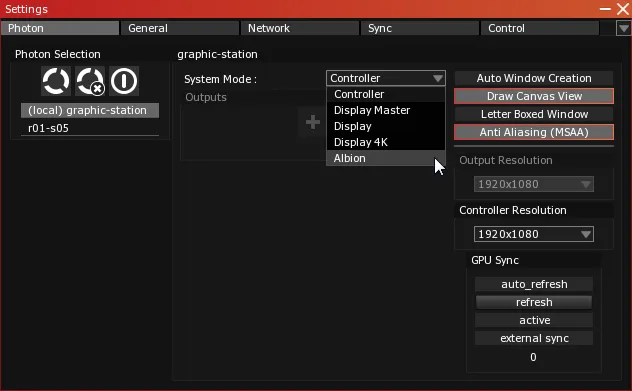
A Display 4K System Mode can also be accessed in the dropdown menu. It was created to support video output in quadrants as a way to adapt to early 4K video interfaces. It is now obsolete because all outputs on NVIDIA Quadro graphics cards can be set at 4K resolution.